ECOMMERCE, WEBSITE DESIGN AND HOSTING

INCREASED CLICK-THROUGH RATES >> INCREASED CONVERSIONS >> INCREASED SALES

GET STARTED CALL NOW: 1.888.558.2446

images_09 images_12 images_17 youtube2 images_09

clickhereto

Retrieve 


Rating   Nobody has rated this Answer yet. Review This Answer
How do I upload images and files?

You can upload images and files by going to "Manage Images and Files".

 

WebsiteForge Members area Manage Images and Files


Next Click on the Folder you wish to upload your images to on the left or create a new folder.


Then click on "upload new files"
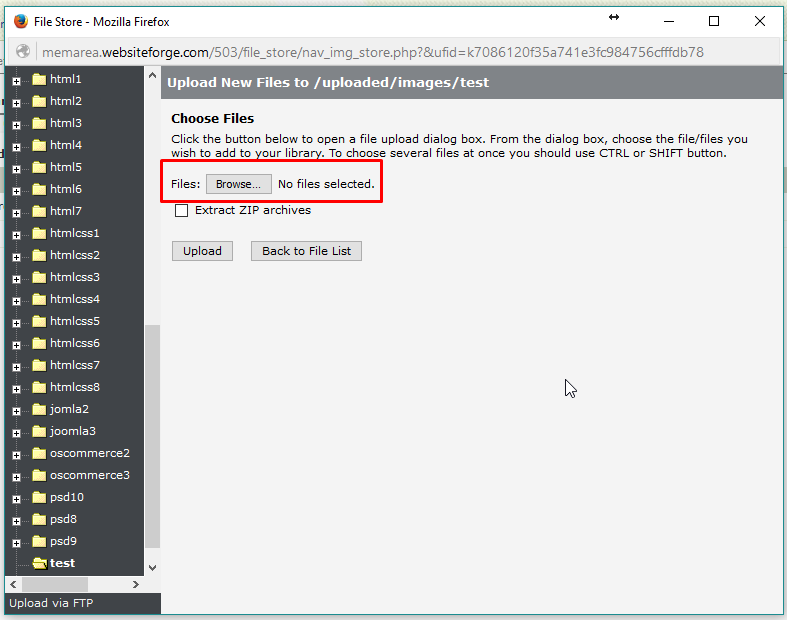
 

WebsiteForge Members area Manage Images and Files


Next click select the files from your computer ( you can choose multiple files at a time)
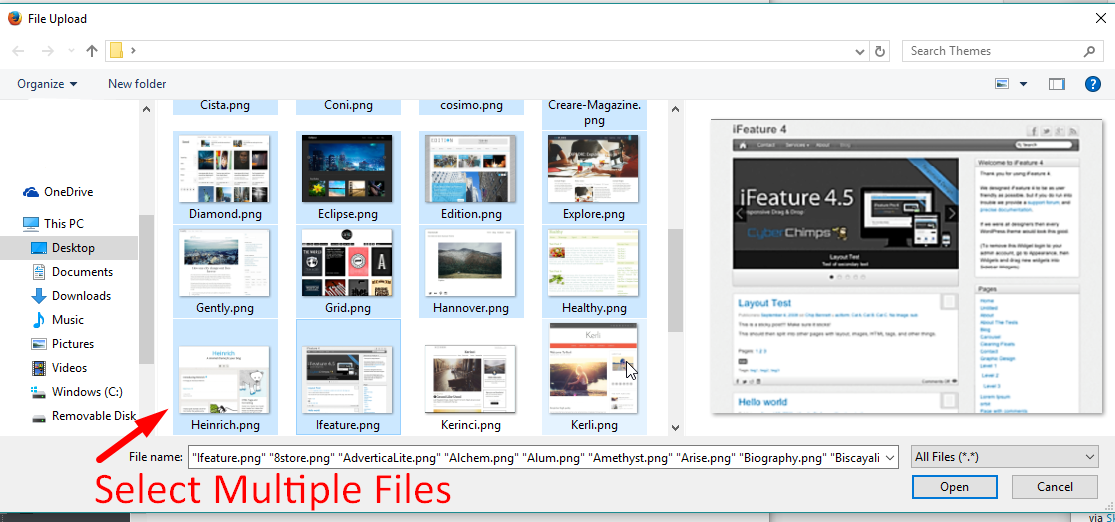
 

WebsiteForge Members area Manage Images and Files


Click on "open" after selecting multiple files (NOTE: you can hold down SHIFT or CTRL to select multiple files)


Next click the "Upload" button and watch the dialog box move accross your screen.


WebsiteForge Members area Manage Images and Files

Any questions or issues please feel free to contact support.
http://ticket.websiteforge.com

Related Links

Recently Visited Links

Review This answer

Please log in or register to post a review.

Customer Reviews

No Reviews


Ecommerce | Ecommerce Web Design | Ecommerce Website Design | Cookies